pnpm dlx shadcn@latest add https://headcodecms.com/r/starter.json
(select Next.js 16)

pnpm drizzle-kit push

Remove:
app/layout.tsx
app/page.tsx

pnpm dev

Open:
Website: http://localhost:3000
Admin: http://localhost:3000/headcode
Default: SQLite (file), Better Auth, file storage
Best for local dev and tryout - no SAAS services required.
Headcode CMS includes a simple admin interface. It combines UI components from shadcn/ui and Kibo UI into flexible TanStack Forms, supporting both single fields and arrays.
This setup makes it easy to define content structures in code and edit them visually in the admin.
Here’s a small example showing how different components come together in the home section for this website:
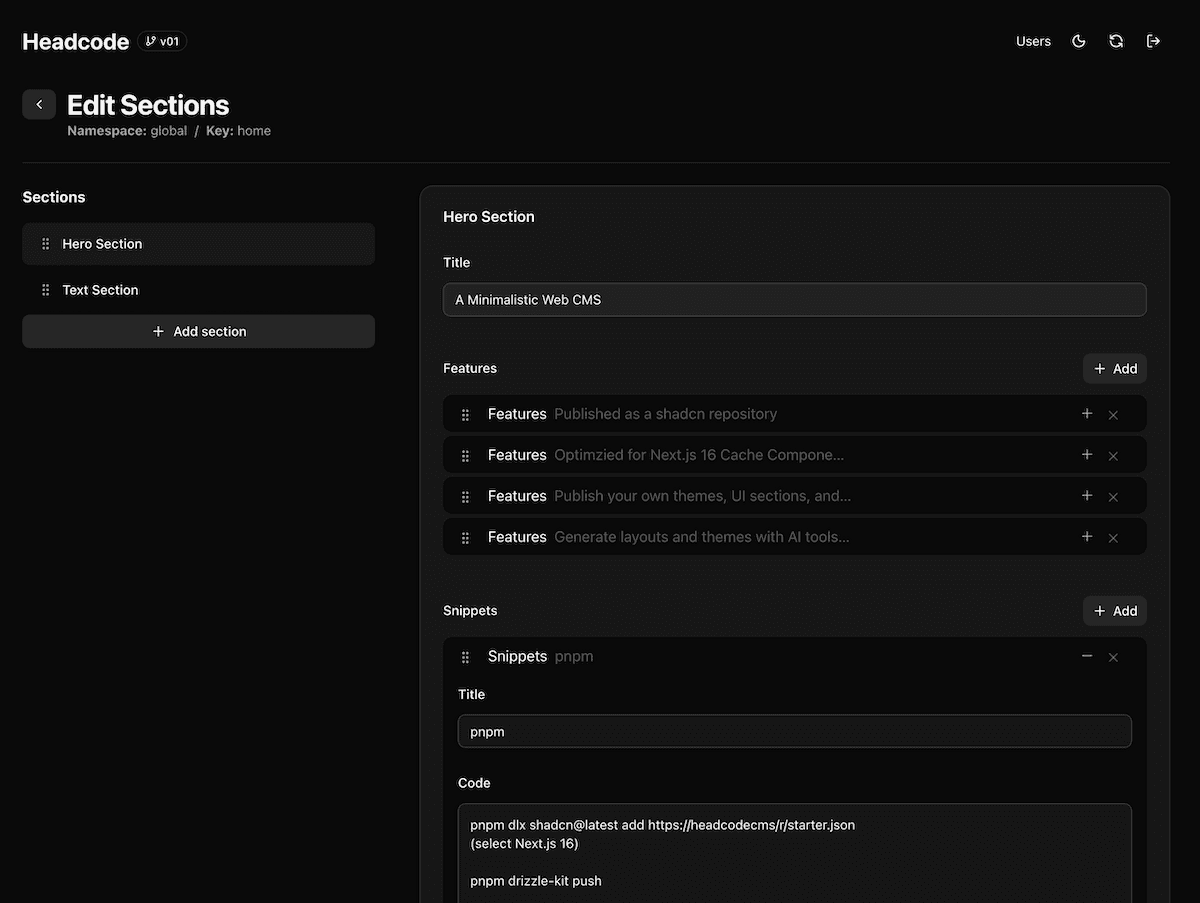
export const heroSection = { name: 'hero', label: 'Hero Section', fields: { title: TextField({ label: 'Title', }), subtitle: TextareaField({ label: 'Subtitle', }), primaryButton: LinkField({ label: 'Primary Button', }), } satisfies Fields,}export type HeroData = InferSectionData<typeof heroSection.fields>export function Hero({ sectionData }) { const { data } = parseSectionData(heroSection.fields, sectionData) return ( <div> <h1>{data.title}</h1> <p>{data.subtitle}</p> <Button href={data.primaryButton.url}> {data.primaryButton.title} </Button> </div> )}I built Headcode CMS because I needed something simpler.
Over the years, I’ve worked on many small and mid-sized website projects. Most of them didn’t need a complex headless CMS or a heavy admin interface. They just needed a few content pages, some structured data, and a simple way to manage and preview updates.
But what I wanted didn’t really exist. At least not in a way that fit naturally into my day-to-day as a frontend developer.
So, I decided to build it myself.
I didn’t want to reinvent the wheel. The web ecosystem already has fantastic tools like shadcn/ui, Next.js, Tailwind CSS, TanStack, Drizzle, TipTap, Zod, and many more. What I missed was a lightweight glue between them. Something easy to drop into a project, version-controlled like the rest of the code, and flexible enough to evolve with it.
So, the core ideas behind Headcode CMS are:
Use what already works: re-use open source tools and components instead of writing everything from scratch.
Install it, not host it: add it directly to your codebase so you can edit, extend, or remove any part of it.
Keep it minimal: small, clear code that you can actually read and understand.
Make it fast: Next.js 16 Cache Components handle performance.
Open by design: you can create your own shadcn registry to share themes, UI sections, or field types.
AI as a helper: let AI tools help generate layouts or themes when that makes sense.
Support real workflows: draft, review, and publish content the way teams already work.
Most web projects I’ve worked on share a similar rhythm. A campaign or product launch is coming up. The team creates content and new components on a preview URL. People review it, give feedback, refine, and then it goes live.
That’s the workflow I had in mind while building Headcode CMS, not an abstract enterprise system, but something that fits naturally into how developers and content people actually collaborate.
Headcode CMS is an open source project built on many wonderful tools from the community, including Next.js, shadcn/ui, Tailwind CSS, TanStack, Drizzle ORM, Better Auth, TipTap, Zod, and so many more. It exists thanks to the people who create, maintain, and share their work in the open.
The first version is published on December 2nd, 2025. It’s still early, and many features are missing. But I want to keep the core small, readable, and easy to maintain.
Here’s what’s next on my list:
Short-term:
Support for more database, storage, and auth providers
Multi-language support for the admin interface
A simple media library
Long-term:
Better integration with AI generation tools
AI app/website builders like v0, Lovable, Bolt, Builder.io are the new theme stores
The TipTap editor stores rich text content in structured JSONContent format. Therefore all Headcode CMS content is accessible as structured JSON data. Make this available for AI tools
Support for other tech stacks like TanStack, Laravel Inertia, Shopify Headless, Convex and add support for additional hosting options
It’s open source. So if something is missing and you have time or ideas, I’d love to see your contribution.
You can help by simply using it, reporting issues, suggesting improvements, or sending pull requests. Stars on GitHub and kind words on social media really help too (use #headcodecms or mention me directly @headcodecms).
Headcode CMS is a side project right now, but I’d love to spend more time on it. If you want to support that, I’ve set up a GitHub Sponsors page. Any support, financial, feedback, or code, means a lot.
Markus
markus@headcodecms.com
https://mext.at
Created with ❤️ in Salzburg, Austria
 Headcode CMS